
Pinterest Affiliate Marketing Without a Blog vs With a Blog (What Works Now)
A lot of beginners ask this:
Can you do affiliate marketing on Pinterest without a blog?
The short answer is:
Yes, you can.
But that does not automatically mean it is the best setup.
Because there is a big difference between:
can work
andworks better long-term
For most beginners, the real goal is not just getting a few clicks.
The goal is building a simple setup that gives you:
more trust
better conversions
more control
more ways to make money later
So in this post, I’ll break down the real difference between Pinterest affiliate marketing without a blog vs with a blog, what works better now, and which path makes the most sense for beginners.

Free Setup Guide
Want the Simple Pinterest Affiliate Setup?
See how content, traffic, and follow-up can work together in a clear beginner-friendly way.
- Simple 3-step setup
- Built for beginners
- Covers pages, traffic, and follow-up
Disclosure: I may earn a commission from links in this post (no extra cost to you).
Can you do Pinterest affiliate marketing without a blog?
Yes.
You do not need a full blog to start using Pinterest for affiliate marketing.
You can still use Pinterest with:
a simple landing page
a bridge page
an opt-in page
a simple funnel
direct linking in some cases
So if your question is:
“Is it possible?”
The answer is yes.
But the more important question is:
“Is it the best setup for most beginners?”
That is where things change.
Pinterest affiliate marketing without a blog: pros and cons
Let’s start with the “no blog” route.
This usually means you are sending traffic from Pinterest to:
a landing page
an opt-in page
a simple bridge page
sometimes directly to an affiliate offer
Pros of doing Pinterest affiliate marketing without a blog
1) Faster to start
You do not need to build out a full website with lots of content first.
That means you can move quicker.
2) Less setup at the beginning
A simple page is easier to manage than a full blog.
This can feel less overwhelming if you are brand new.
3) Easier to stay focused
With one page and one goal, the setup feels cleaner.
That can help if you want to keep things simple.
Cons of doing Pinterest affiliate marketing without a blog
1) Less trust
This is the biggest issue.
Pinterest traffic is cold.
People are clicking from a pin. They do not know you yet.
A blog post gives them:
context
education
trust
proof
a reason to stay longer
A simple page can still work, but it usually has less trust built in.
2) Less control over the click
A blog gives you more room to:
explain the topic
match the pin promise
answer objections
warm up the visitor
Without that, the click has less support.
3) Harder to monetize long-term
A blog can make money in more ways:
affiliate links
opt-ins
email follow-up
internal links
related posts
display ads later
A single page is more limited.
4) Fewer keyword opportunities
A blog gives you many URLs, many topics, and more chances to rank and get traffic.
Without a blog, you lose a lot of that depth.
Want the simple setup behind this?
Get the free Pinterest affiliate blueprint. It shows the simple flow: niche → pins → one page → email follow-up.
Related reading: How to Add Affiliate Links on Pinterest (Safe & Simple)
Pinterest affiliate marketing with a blog: pros and cons
Now let’s look at the blog route.
This usually means:
Pinterest pin → blog post → opt-in or offer
For most beginners, this is the stronger long-term setup.
Pros of using a blog
1) More trust
This is the biggest win.
A blog post gives you space to:
teach something useful
explain the next step
sound more human
make the offer feel natural
That matters a lot with Pinterest traffic.
2) Better message match
If your pin says:
“Best Pinterest niches”
“How to add affiliate links”
“Clicks but no sales”
…a blog post can match that promise very clearly.
That helps people stay on the page longer.
3) Easier to collect emails
A blog is one of the best places to build your list.
You can place:
top inline opt-in
middle inline opt-in
bottom opt-in
sticky CTA
soft bridge to your offer
That gives you more chances to turn the click into a lead.
4) Easier to recommend affiliate offers naturally
A blog post lets you explain:
why the tool matters
who it helps
where it fits
what problem it solves
This makes affiliate links feel more helpful and less pushy.
5) Stronger long-term asset
A blog becomes something you own and grow over time.
Each post adds:
more traffic potential
more keywords
more internal links
more trust
more monetization paths
That compounds.
Cons of using a blog
1) More setup at first
A blog takes more work than a single page.
You need:
hosting
a domain
content
structure
internal links
So yes, it is slower to build.
2) More moving parts
There is more to manage.
That can feel heavier at the start if you want results fast.
3) It can become messy if you do too much
If you post random topics with no structure, the blog route gets weaker.
A blog works best when it is focused.
So what works better now?
For most beginners, this works better now:
Pinterest pin → blog post or simple bridge page → opt-in → email follow-up
That is the strongest middle ground.
Why?
Because it gives you:
enough trust
enough simplicity
enough room to warm people up
a second chance through email
This setup is better than random direct linking for most people.
And it is stronger long-term than only relying on one page with no content depth.
When “without a blog” can still work
Let’s be fair.
There are times when the “no blog” route still makes sense.
It can work if:
your page is very clear
the offer fit is strong
the pin promise matches the page closely
your CTA is simple
you follow up by email
you are not expecting instant first-click sales from cold traffic
In other words:
without a blog can work best when you still use a clean bridge page and follow-up system
If you want a simple way to do that without building a full blog first, this beginner-friendly all-in-one tool can help you build one page and follow up with email in the same place.
That is one reason this route can still make sense for beginners who want a simpler start.
When “with a blog” makes more sense
For most people, a blog makes more sense if you want to build something more stable.
A blog is usually the better choice when you want to:
publish multiple helpful posts
target different Pinterest keywords
build trust over time
collect more emails
recommend affiliate offers more naturally
create a stronger long-term asset
If that is your goal, the blog route usually wins.
If you want a simple way to get your blog online, this beginner blog setup is one easy place to start.
And if you want to register a domain separately, this domain service is a simple option to look at.
That gives you the basic pieces for the blog path:
domain
hosting
content
traffic
follow-up
Related reading: Pinterest Pin Strategy for Affiliate Sales (Not Just Clicks)
The real difference: control
This is what it really comes down to.
Without a blog
You have:
faster setup
less content depth
less trust
fewer ways to warm traffic
With a blog
You have:
slower setup
more trust
more content depth
better message match
stronger long-term control
That is why most people who want long-term Pinterest income do better with some kind of content layer, even if it starts small.
Best beginner setup (simple version)
If you are a beginner, I would not overcomplicate this.
Use a setup like this:
1) Pick one niche
Not five.
One.
2) Create one clear destination
This can be:
a blog post
a landing page
a bridge page
3) Add one main CTA
Usually:
free guide
checklist
simple blueprint
4) Follow up by email
This is where a lot of the money happens later.
That is the clean setup.
Not:
random links
random offers
random pins
Simple wins.
If you do not want a full blog yet, do this
You do not have to choose between:
a giant blog
orno content at all
There is a middle ground.
You can start with:
one landing page
one bridge page
one lead magnet
one short follow-up sequence
That is often enough to begin.
Then later, you can expand into more blog content when you are ready.
This is usually smarter than waiting for the “perfect site” before you start.
If you already have a blog, do this
If you already have a blog, use it properly.
Do not treat it like a random article dump.
Use it as a system:
one niche
related posts
matching boards
clear opt-ins
soft offer mentions
internal links
That is where the blog route becomes powerful.
A blog is not just “content.”
It is the place where Pinterest clicks become:
trust
leads
affiliate clicks
sales later
Which path should you choose?
Here is the simple answer.
Choose “without a blog” if:
you want to start fast
you feel overwhelmed by a full site
you can keep the setup simple
you are willing to use one clear page + email follow-up
Choose “with a blog” if:
you want more trust
you want more content depth
you want more keyword coverage
you want a stronger long-term asset
you want more ways to monetize later
For most people who are serious about Pinterest affiliate marketing, the best answer is:
start simple, but build toward the blog/content route
That gives you the best of both.
What usually converts better?
In most cases:
Pin → blog post or bridge page → opt-in → email follow-up
converts better than:
Pin → direct random affiliate offer
Why?
Because cold Pinterest traffic usually needs:
a little context
a little trust
a clear next step
That is what the page gives you.
If you are getting clicks but no sales, this is usually part of the problem.
You can also read:
Pinterest Clicks but No Sales? Here’s What’s Missing (Fix This)
Quick checklist: blog or no blog?
Ask yourself:
✅ Do I want the fastest possible setup?
✅ Do I want more trust?
✅ Do I want long-term traffic growth?
✅ Do I want to build an email list?
✅ Do I want more than one way to monetize?
✅ Can I keep the setup simple?
If you mostly want speed:
start with a simple page.
If you mostly want long-term growth:
build toward the blog route.
My honest recommendation
If you are brand new, I would not make this harder than it needs to be.
Start with a simple system.
But I would still lean toward:
Pinterest → helpful page → opt-in → follow-up
That can be:
a blog post
a bridge page
a simple landing page with context
For most beginners, that works better than trying to force cold Pinterest clicks straight into a sale.
Want the simple setup behind this?
If you want the clean beginner setup for Pinterest affiliate marketing:
Get the free Pinterest affiliate blueprint.
It shows the simple flow: niche → pins → one page → email follow-up.
Download the free guide here ↓
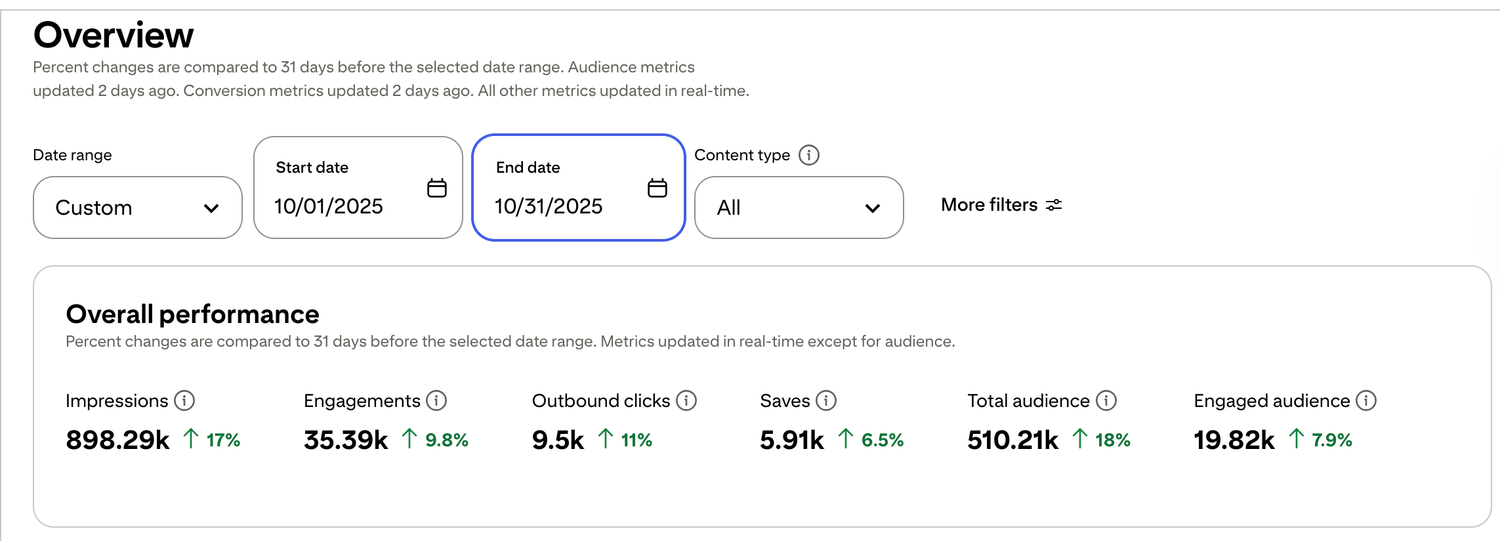
🎯 See a Real Pinterest Traffic Example
This snapshot shows how content, pin design, and posting can work together over time.
If you want my exact Pinterest affiliate setup (landing page + emails + weekly pin plan), I organized it step-by-step inside my Core System (it’s $27). No pressure — But if you want Pinterest traffic to turn into commissions, the setup matters more than trying to do everything at once.

Free guide for beginners who want a simpler starting point
🎯 Ready to See the Free Guide?
Download the guide and explore the simple setup inside.
🔒 100% Secure • No Spam • Unsubscribe Anytime

A blog sharing practical tips on online tools, affiliate marketing, beginner-friendly workflows, and working from home.


