
Pinterest Clicks but No Sales? Here’s What’s Missing (Fix This)
Getting clicks from Pinterest feels great.
But when you check your stats and see no sales, it can feel confusing.
Here’s the truth:
Pinterest is a top-of-funnel platform.
People click because they’re curious. They want an idea. A shortcut. A plan.
Most of them are not ready to buy on the first click.
So the goal isn’t “more clicks.”
The goal is turning clicks into momentum:
click → trust → next step → follow-up → sale
This post shows what’s usually missing — and the simple fixes.
New here? Grab the free setup guide ↓

Free Setup Guide
Want the Simple Pinterest Affiliate Setup?
See how content, traffic, and follow-up can work together in a clear beginner-friendly way.
- Simple 3-step setup
- Built for beginners
- Covers pages, traffic, and follow-up
Disclosure: I may earn a commission from links in this post (no extra cost to you).
Quick check: Are you really getting “clicks but no sales”?
Before we fix anything, make sure you know what you’re looking at.
Pinterest gives you:
Outbound clicks (people leaving Pinterest to your link)
Engagement (saves, close-ups, etc.)
What you want is outbound clicks.
Then on your site, you want to check:
Page views
Time on page
Opt-ins
Email clicks
Because here’s what happens a lot:
People get clicks… but the page doesn’t load fast, or it doesn’t match the pin, so they bounce.
So it looks like “Pinterest traffic doesn’t convert,” but really it’s a page + flow problem.
The #1 reason Pinterest traffic doesn’t convert: Message mismatch
Pinterest users click for one reason:
They want the thing the pin promised.
If your pin says:
“Pinterest affiliate links (safe setup)”
But your page starts with:
“Build a $600/day system fast”
That feels like a jump.
Even if your offer is good, the user thinks:
“This isn’t what I clicked for.”
And they leave.
Fix this first
Make sure these 3 things match:
1) Pin text / title
2) The first headline on your page
3) The first 5 seconds of the page content
If they match, people stay longer.
If they don’t, people bounce.
Why Pinterest clicks don’t convert (7 common leaks)
Let’s break down the real reasons you’re seeing traffic but no conversions.
Leak #1: You’re sending traffic to the wrong page
Most beginners send Pinterest traffic to:
a homepage
a category page
a messy blog feed
a random long article with no clear next step
Pinterest traffic needs one clear page.
A page that answers:
What is this?
Who is it for?
What do I do next?
Fix: Use a simple “bridge page” (blog post or landing page) with one main goal:
✅ opt-in (or one clean CTA)
Leak #2: There’s no clear next step (no CTA)
People click, read a bit… then they don’t know what to do.
They leave.
Pinterest users are not going to “figure it out.”
Fix: Put one main CTA above the fold, like:
“Get the free guide”
“Download the checklist”
“Use the template”
Then place a second CTA mid-post and at the end.
Simple.
Leak #3: Too many links = too many choices
If your page has:
8 buttons
12 links
a bunch of random offers
Pinterest users get decision fatigue.
They bounce.
Fix: One page = one main goal.
If your goal is opt-in:
keep your links minimal
keep your button consistent
don’t distract them
📘 If This Matches Where You Are, Start Here
Get the free guide that breaks down the simple setup behind this process and what to focus on first.
Related reading: How to Add Affiliate Links on Pinterest (Safe & Simple)
Leak #4: Your page doesn’t build trust fast enough
Pinterest traffic is cold.
They don’t know you yet.
So they ask (silently):
“Is this legit?”
“Is this spam?”
“Will this waste my time?”
Fix: Add quick trust signals:
a simple disclosure line
a “why this works” explanation
a proof snapshot (optional)
an “about” line (1 sentence)
Example:
“Quick note: This post may contain affiliate links.”
“I test simple systems and share what works.”
That alone helps.
Leak #5: Your pin design gets clicks… but attracts the wrong people
Some pins get clicks because they look exciting, not because they attract buyers.
Examples:
too hypey
too vague
too “make money fast”
too broad
That traffic doesn’t convert.
Fix: Make your pins more specific:
“Pinterest affiliate links (safe setup)”
“Landing page for Pinterest traffic (template)”
“Clicks but no sales? fix this”
Specific pins pull people who actually want a system.
Leak #6: You’re asking for the sale too early
Pinterest is not warm traffic.
If the first thing they see is a hard pitch, they bounce.
Even if the offer is good.
Fix: Use the simple flow:
value → free next step → follow-up → sale
That’s why opt-ins are so powerful.
You’re not losing the click.
You’re capturing it.
Leak #7: You have no email follow-up
This is the biggest money leak.
If someone clicks your blog post and leaves, they’re gone.
Pinterest traffic needs repeated exposure.
Email is how you get that.
Fix: Add a lead magnet + short email sequence that:
helps them
builds trust
recommends your offers naturally
Even a simple 5–7 email sequence can turn “no sales” into steady commissions.
The simple “Pinterest conversion” system (copy this)
If you want Pinterest to convert, use this simple setup:
Step 1: Make the pin promise clear
Example:
“Pinterest affiliate links: safe setup”
Step 2: Send them to one clear page
That page should:
match the promise
teach something useful
give one next step
Step 3: One main CTA (opt-in)
Example CTA:
“Get the free Pinterest setup blueprint”
Step 4: Email follow-up
Send:
simple help
small wins
a tool recommendation (optional)
your $ sale page or Affiliates offer.
This is how clicks turn into money.
Not by “more pins.”
By better flow.
Quick “Fix This Today” checklist
If you’re getting Pinterest clicks but no sales, fix these 5 things first:
✅ Your pin matches your page headline
✅ Your page has one clear CTA above the fold
✅ Your page builds trust fast (disclosure + clarity)
✅ You’re not sending traffic to a homepage
✅ You’re capturing emails (so clicks aren’t wasted)
Do that and your conversions improve.
What to track (so you stop guessing)
Pinterest gives you clicks.
But you need to track what happens after the click.
Track:
1. Outbound clicks (Pinterest)
2. Page views (your site)
3. Opt-in rate (lead magnet page)
4. Email clicks (link clicks inside emails)
If you want a simple guide on tracking, read: How to Track Pinterest Affiliate Clicks (So You Stop Guessing)
The best landing page for Pinterest traffic (simple template)
If you’re sending traffic to a messy page, fixing your landing page can change everything.
Pinterest traffic converts best on a page that has:
a clear headline
a short explanation
one CTA
trust signals
simple layout
Read:
Best Landing Page for Pinterest Affiliate Traffic (Simple Template)
Want the exact setup behind the flow?
If you want the clean system that turns clicks into momentum:
Get the free Pinterest affiliate blueprint (niche → pins → one page → email follow-up).
Download the free guide here ↓
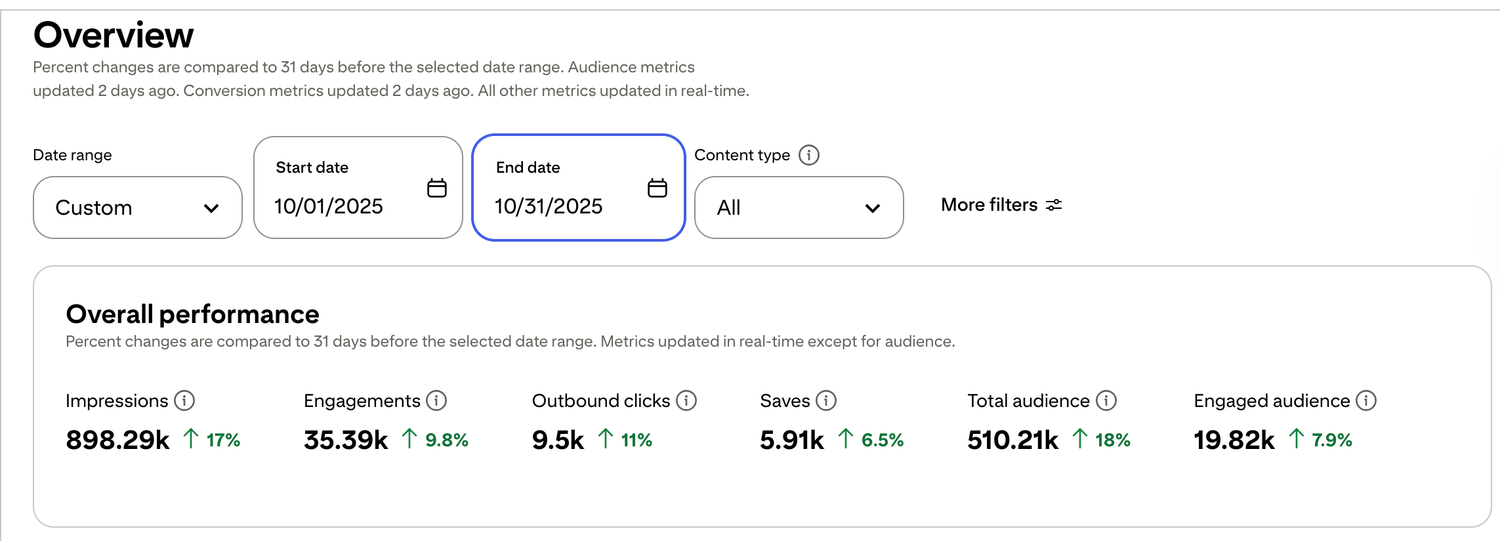
🎯 See a Real Pinterest Traffic Example
This snapshot shows how content, pin design, and posting can work together over time.
If you want my exact Pinterest affiliate setup (landing page + emails + weekly pin plan), I organized it step-by-step inside my Core System (it’s $27). No pressure — just the full process in one place.

Free guide for beginners who want a simpler starting point
🎯 Ready to See the Free Guide?
Download the guide and explore the simple setup inside.
🔒 100% Secure • No Spam • Unsubscribe Anytime

A blog sharing practical tips on online tools, affiliate marketing, beginner-friendly workflows, and working from home.


