
How to Add Affiliate Links on Pinterest (Safe & Simple)
Pinterest can send you a lot of clicks.
But if you use affiliate links the wrong way, you can lose reach fast.
This post will show you the safe, simple way to add affiliate links on Pinterest — in a way that fits how Pinterest works (and how Pinterest users behave).
No hype. No shady tricks. Just a clean beginner setup.
New here? Grab the free setup guide ↓

Free Setup Guide
Want the Simple Pinterest Affiliate Setup?
See how content, traffic, and follow-up can work together in a clear beginner-friendly way.
- Simple 3-step setup
- Built for beginners
- Covers pages, traffic, and follow-up
Disclosure: I may earn a commission from links in this post (no extra cost to you).
Can you use affiliate links on Pinterest?
Yes.
Pinterest allows affiliate links.
But you have to follow basic rules:
Don’t mislead people
Don’t spam
Disclose affiliate links
Don’t hide or “cloak” links
Don’t use fake income claims
If you keep it simple and honest, you’ll be fine.
Pinterest mindset (why people click)
Pinterest is not like Instagram.
People don’t usually scroll to “hang out.”
They scroll because they want an idea, a solution, a plan, or a shortcut.
That means your pins should feel like:
“Here’s a simple guide”
“Here’s a beginner checklist”
“Here’s a template”
“Here’s what worked for me”
“Here’s what to avoid”
When your pin matches that mindset, you get clicks that actually matter.
The safest way to use affiliate links on Pinterest
Here’s the safe method I recommend for most beginners:
Pin → helpful page (blog post or landing page) → affiliate link
Why this works better than direct affiliate links:
More trust
People want context. A helpful page explains what they’re clicking.Better conversions
Warm traffic converts better than cold traffic.More control
You can update the page anytime without changing the pins.Less risk
It looks clean and natural, not like “random affiliate spam.”
Can you direct-link affiliate links on Pinterest?
Sometimes, yes.
But I still recommend the “helpful page first” method because it’s safer and usually makes more money long-term.
How to add affiliate links on Pinterest (step-by-step)
Step 1: Get your affiliate link
Go to your affiliate dashboard (ShareASale, Impact, ClickBank, etc.) and grab your link.
Make sure it’s a real link from the platform — not something copied from a random place.
Step 2 (recommended): Create a simple helpful page
This can be:
A blog post
A simple landing page
A “resources” page
A quick review page
A mini guide page
The goal is simple:
Give the click a reason to trust you before sending them to the offer.
Step 3: Create a new Pin
In Pinterest, create a fresh pin.
Use a clean design that matches the promise.
Keep your text simple.
Examples (safe + honest):
“Pinterest affiliate links: beginner setup”
“How to add affiliate links (safe way)”
“What Pinterest allows + what to avoid”
“Clicks but no sales? fix this”
Avoid crazy claims like:
“Make $10k this week”
“Instant money”
“Guaranteed income”
Pinterest users don’t trust that stuff anyway.
📘 If This Matches Where You Are, Start Here
Get the free guide that breaks down the simple setup behind this process and what to focus on first.
Related reading: You’re Getting Traffic… But No Money. Here’s Why.
Step 4: Add your destination URL
In the “Link” field, add your URL.
If you’re using the safe method, your link should be your blog post or landing page, not the raw affiliate link.
Step 5: Write your title + description
Keep it clear and useful.
Good example title:
How to Add Affiliate Links on Pinterest (Safe Setup)
Good example description:
“Pinterest allows affiliate links, but you have to do it the right way. Here’s the simple beginner setup, where to put links, and how to disclose properly.”
You don’t need to write a novel.
Pinterest likes clear, searchable keywords.
Step 6: Add affiliate disclosure
Don’t skip this.
It’s simple and it protects you.
You can disclose in the Pin description and/or on your landing page.
Best practice: do both.
Step 7: Save to the right board
This part matters more than most people think.
Save your pin to a board that matches the topic.
For example:
“Pinterest Affiliate Marketing”
“Make Money on Pinterest”
“Pinterest for Beginners”
Don’t save it to random boards like frugal living or remote jobs.
Board mismatch can kill performance.
Where to put affiliate links (3 common options)
Option 1 (best): Put the affiliate link on your page
Pin goes to your page → your page links to the affiliate offer.
This is the cleanest setup.
Option 2: Direct affiliate link in the pin
This can work, but it’s easier to mess up.
If you do this:
be extra honest
disclose clearly
don’t spam the same link everywhere
Option 3: Link hub in profile
This is fine, but it’s not necessary.
Pinterest users usually click the pin link, not your profile.
Use a link hub only if it helps your overall setup.
Affiliate disclosure on Pinterest (simple examples)
Use one short line.
Here are beginner-safe examples you can copy:
“Affiliate link — I may earn a commission at no extra cost to you.”
“This post contains affiliate links.”
“Some links are affiliate links. Thanks for supporting my work.”
“#affiliate #ad”
Keep it clear.
No one gets mad when you’re honest.
If you want more examples: read Affiliate Disclosure for Pinterest (Simple Examples + Where to Put It)
Pinterest affiliate marketing rules (simple version)
Here are the rules that matter most in real life:
1) Don’t spam
Don’t post the same URL to 20 boards in one day.
That looks like spam.
A safer pattern:
3–4 boards per URL
spread over time
fresh designs
2) Don’t mislead
Avoid fake screenshots, fake earnings, or “guaranteed” promises.
Pinterest is cracking down on misleading content.
And honestly… the audience is smarter than that now.
3) Don’t hide links
Avoid shady link shorteners and weird redirects.
Clean links build trust.
4) Don’t copy other people’s pins exactly
You can take inspiration, but don’t copy their whole design.
Make it yours.
5) Make the click worth it
If the pin promises “simple beginner setup,” your page should deliver that.
If people click and bounce, Pinterest learns your pin isn’t satisfying.
That can slow distribution.
Beginner examples (simple setups that work)
Example 1: Promoting a tool
Pin text: “Pinterest scheduling tool (beginner guide)”
Pin link goes to:
A quick blog post:
what the tool does
who it’s for
pros/cons
how to use it
your affiliate link button
Example 2: Promoting a course
Pin text: “Pinterest affiliate system (start here)”
Pin link goes to:
A landing page with:
3-step plan
what they get
who it’s for
opt-in for free checklist
soft option to buy your $ offer or affiliate links you recomeded.
Example 3: Promoting an affiliate product
Pin text: “Best planner for beginners (simple review)”
Pin link goes to:
A review page with:
who it’s good for
what problem it solves
what to expect
disclosure
affiliate link
Common mistakes (that kill reach fast)
Mistake 1: No disclosure
It’s not worth the risk.
Just disclose.
Mistake 2: Board mismatch
If your pin is about Pinterest affiliate marketing, don’t save it to “Work From Home Jobs.”
Pinterest needs strong topic signals.
Mistake 3: Too many pins to the same URL too fast
Slow it down.
Spread your pins out over days/weeks.
Mistake 4: Overhyped money claims
Even if you mean well, it can look spammy.
Be real.
Mistake 5: Sending clicks to a thin page
If your page is 5 lines long with one affiliate button, it often won’t convert.
Pinterest traffic needs:
quick value
simple structure
trust

Related reading: How to Turn Clicks Into Momentum (Not Hacks)
Quick checklist (copy/paste)
Before you publish a pin with affiliate intent:
✅ The pin matches the page
✅ The board matches the pin
✅ The link is clean (no weird redirects)
✅ You used disclosure
✅ Your page has real value
✅ You’re not spamming the same URL
✅ You can track clicks
Want the exact beginner setup?
Grab my Pinterest Affiliate Blueprint to Get Started
It shows the exact steps: niche → pins → landing page → email follow-up.
Grab the Free Affiliate Buleprint here ↓
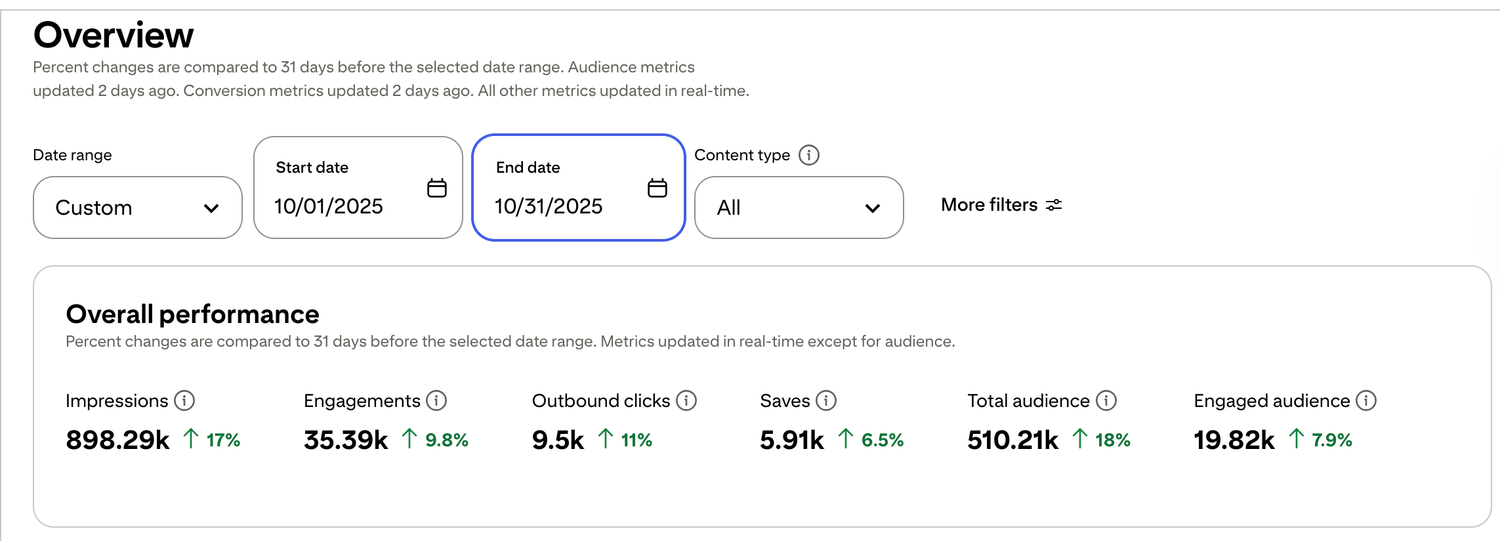
🎯 See a Real Pinterest Traffic Example
This snapshot shows how content, pin design, and posting can work together over time.
If you want my exact Pinterest affiliate setup (landing page + emails + weekly pin plan), I organized it step-by-step inside my Core System (it’s $27). No pressure — just the full process in one place.

Free guide for beginners who want a simpler starting point
🎯 Ready to See the Free Guide?
Download the guide and explore the simple setup inside.
🔒 100% Secure • No Spam • Unsubscribe Anytime

A blog sharing practical tips on online tools, affiliate marketing, beginner-friendly workflows, and working from home.


