
Pinterest Pin Strategy for Affiliate Sales (Not Just Clicks)
A lot of people think Pinterest is about making “pretty pins.”
Pretty pins can get clicks.
But clicks don’t pay bills.
Affiliate sales come from a different kind of pin:
Pins that attract the right person, with the right promise, and send them to the right next step.
This post is a simple Pinterest pin strategy for affiliate sales — not just traffic.
New here? Grab the free setup guide ↓
Free Setup Guide
Want the Simple Pinterest Affiliate Setup?
See how content, traffic, and follow-up can work together in a clear beginner-friendly way.
- Simple 3-step setup
- Built for beginners
- Covers pages, traffic, and follow-up
Disclosure: I may earn a commission from links in this post (no extra cost to you).
The truth: “pretty pins” don’t convert by themselves
You can have:
clean design
nice fonts
good colors
…and still get no sales.
Why?
Because your pin might be attracting:
curiosity clicks
random clicks
people who are not ready
The goal is not “more clicks.”
The goal is better clicks.
Clicks that:
stay on your page
opt in
trust you
take the next step
That’s what converts.
The 3 types of pins that convert (simple system)
If you only post one type of pin, you’ll usually hit a ceiling.
Here are the 3 pin types that create sales:
1) Problem Pins (pain-aware)
These work because they match what people are already frustrated about.
Examples:
“Pinterest clicks but no sales? Fix this”
“Traffic isn’t the problem — your flow is”
“Why Pinterest traffic doesn’t convert”
These pins pull in people who want a solution now.
2) Solution Pins (how-to / checklist)
These work because Pinterest is a “save” platform.
People love:
steps
templates
checklists
simple guides
Examples:
“How to add affiliate links on Pinterest (safe)”
“Best landing page for Pinterest traffic (template)”
“Pinterest affiliate setup (3 steps)”
These pins build trust fast.
3) Proof Pins (credibility)
These work because they remove doubt.
Proof doesn’t need to be insane income screenshots.
Pinterest users trust:
analytics screenshots (outbound clicks)
timeline style (“what happened after 30 days”)
simple results (“from 0 to consistent clicks”)
Examples:
“Real Pinterest analytics (outbound clicks)”
“What changed when I used one page + email follow-up”
“What actually happens when you follow one system”
Proof pins warm up buyers.
The “pin promise” rule (most important)
A pin converts when it makes one clear promise.
Not five.
Not “everything.”
One.
Bad pin promise (too broad)
“Make money online with Pinterest!”
That’s vague. It attracts random clicks.
Good pin promise (specific)
“Pinterest affiliate links: safe setup”
This attracts the exact person searching that.
Rule: One pin = one idea.
If you want to cover 5 ideas, create 5 pins.
The conversion formula (simple)
Here’s the formula I use for “pins that convert”:
1) Keyword + outcome
“Pinterest affiliate links (safe setup)”
“Pinterest landing page (simple template)”
“Pins that convert (not just clicks)”
2) Clear expectation
Tell them what they’re going to get:
steps
checklist
template
examples
3) One next step
A simple CTA:
“Read the guide”
“Get the checklist”
“Use the template”
That’s it.
Pinterest users don’t want pressure.
They want clarity.
📘 If This Matches Where You Are, Start Here
Get the free guide that breaks down the simple setup behind this process and what to focus on first.
Related reading: How to Add Affiliate Links on Pinterest (Safe & Simple)
Titles that convert (keep it simple)
Pinterest titles should be:
keyword-first
specific
beginner-friendly
Here are easy title patterns you can reuse:
Pattern A: “How to” (high intent)
How to Add Affiliate Links on Pinterest (Safe & Simple)
How to Track Pinterest Affiliate Clicks (Stop Guessing)
Pattern B: “Problem + fix”
Pinterest Clicks but No Sales? Here’s What’s Missing
Getting Traffic but No Sales? Fix This
Pattern C: “Best / template”
Best Landing Page for Pinterest Affiliate Traffic (Template)
Best Pinterest Niches for Affiliate Marketing (That Convert)
Pattern D: “Not X, but Y”
Pinterest Pin Strategy for Affiliate Sales (Not Just Clicks)
Not More Pins — Better Pins
These patterns are Pinterest-native.
People click them because they feel helpful, not salesy.
Descriptions that convert (what to write)
Keep descriptions simple.
Use:
1–2 keywords
one clear value line
one honest expectation
Example description:
“Getting clicks but no sales? This post shows the real conversion leaks and the simple fixes: message match, landing page, and email follow-up.”
Avoid:
big money claims
“guaranteed results”
too many emojis
spammy wording
Pinterest is getting stricter.
And the audience is tired of hype.
Simple wins.
Your visual strategy (Pinterest-safe + conversion focused)
Design matters, but not because of “beauty.”
Design matters because it controls clarity.
What converts best (most of the time)
clean layout
one headline
big readable text
high contrast
lots of empty space
one idea per pin
What hurts conversions
too much text
tiny fonts
too busy
multiple messages
confusing visuals
Pinterest-safe rule
Don’t mass-post the same design with tiny changes.
Rotate:
layouts (3–5)
backgrounds
images
fonts
headline angles
Even if it’s the same URL, your pins should look fresh.

Board strategy (so Pinterest understands you)
Pinterest is a categorization machine.
If you save pins to random boards, you confuse it.
keep boards tight.
Simple routing rule
For each URL:
pin to 4–5 boards max
rotate boards over time
don’t post the same URL to 10 boards in one day
That keeps you Pinterest-safe and builds stronger topic signals.
Posting strategy (how often)
You don’t need to post 50 pins per day for one URL.
You need consistency.
A safe schedule for one URL
Day 1–14: 1 pin per day (rotate designs)
Day 15–45: 1 pin every 2 days
Day 46+: 1–2 pins per week (keep winners alive)
Pinterest likes steady output.
Not bursts.
What makes pins convert into affiliate sales (the missing part)
Here’s what most people miss:
Even a perfect pin can’t convert if the page doesn’t match.
Your page must do 3 things fast
1. Match the pin promise (same topic, same language)
2. Give a quick win (steps, checklist, clarity)
3. Offer a next step (opt-in + email follow-up)
If you want a full breakdown, read:
Pinterest Clicks but No Sales? Here’s What’s Missing (Fix This)
That post shows the conversion leaks.
The “Pinterest conversion stack” (simple)
If you want affiliate sales from Pinterest, stack these:
✅ Good pin promise
✅ Matching page headline
✅ One clear CTA (opt-in)
✅ Email follow-up
✅ Soft recommendation (affiliate offer)
This is how you stop relying on luck.
Mini pin plan you can copy
For each post, create 15–30 pins using this structure:
10 pins = Solution pins
how-to
checklist
template
“start here”
10 pins = Problem pins
“why it’s not working”
“what you’re missing”
“fix this”
5–10 pins = Proof pins
analytics screenshot
timeline
“what happened when…”
That mix gets:
clicks
saves
higher-intent traffic
better conversions
Want the exact setup?
If you want the full beginner system behind this strategy:
Download the free Pinterest affiliate blueprint (niche → pins → one page → email follow-up).
Get the free guide here ↓
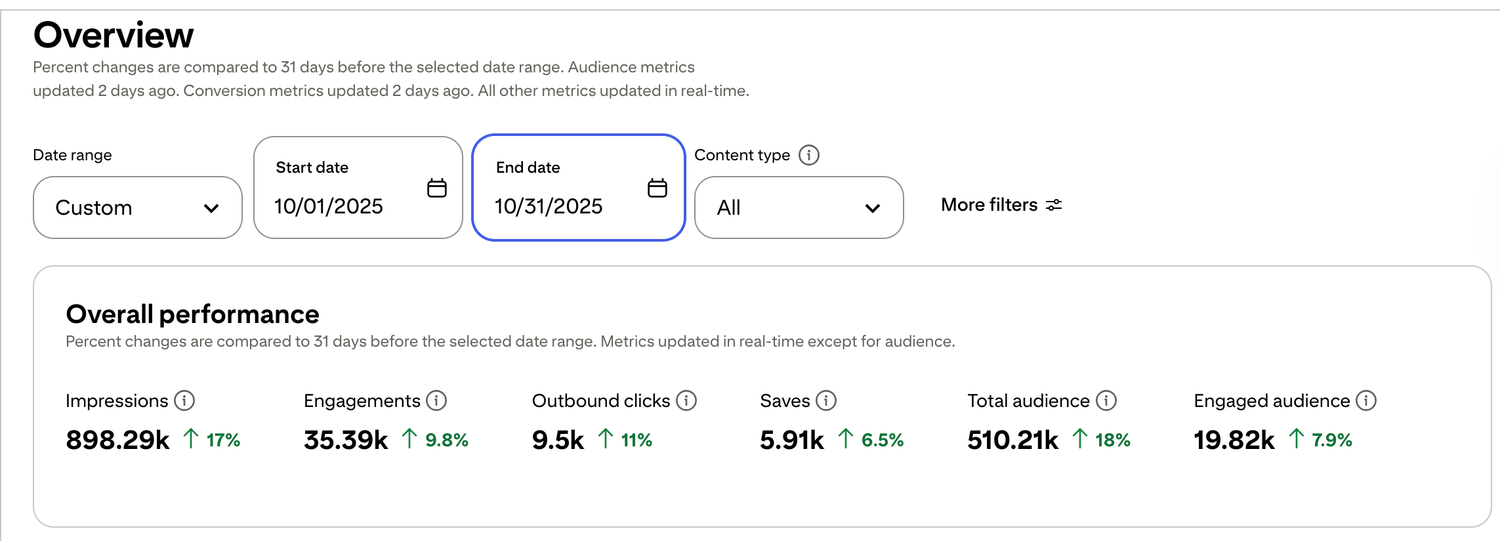
🎯 See a Real Pinterest Traffic Example
This snapshot shows how content, pin design, and posting can work together over time.
If you want my exact Pinterest affiliate setup (landing page + emails + weekly pin plan), I organized it step-by-step inside my Core System (it’s $27). No pressure — just the full process in one place.

Free guide for beginners who want a simpler starting point
🎯 Ready to See the Free Guide?
Download the guide and explore the simple setup inside.
🔒 100% Secure • No Spam • Unsubscribe Anytime

A blog sharing practical tips on online tools, affiliate marketing, beginner-friendly workflows, and working from home.


