
Affiliate Disclosure for Pinterest (Examples + Where to Put It)
if you use affiliate links on Pinterest, you should disclose them.
That does not need to be complicated.
You do not need a fancy legal paragraph.
You just need to be clear, honest, and easy to understand.
This post will show you:
why affiliate disclosure matters
where to put it
simple examples you can copy
what to avoid
If you are a beginner, keep this simple:
Make it obvious that a link may earn you a commission.
That is the goal.
New here? Start with the free guide that shows the setup behind this process ↓
Free Setup Guide
Want the Simple Pinterest Affiliate Setup?
See how content, traffic, and follow-up can work together in a clear beginner-friendly way.
- Simple 3-step setup
- Built for beginners
- Covers pages, traffic, and follow-up
Disclosure: I may earn a commission from links in this post (no extra cost to you).
Do you need an affiliate disclosure on Pinterest?
Yes.
If you use affiliate links on Pinterest, you should disclose that clearly.
This helps with:
honesty
trust
clearer expectations
a cleaner long-term setup
A disclosure is not there to scare people away.
It is there to make your content more transparent.
And honestly, that helps trust.
Why affiliate disclosure matters
A lot of beginners skip this because they think:
“It’s obvious anyway”
“Nobody else does it”
“It might hurt clicks”
That is the wrong way to think about it.
A good disclosure helps because it shows:
1) You are being honest
That matters.
Especially with Pinterest traffic, where people do not know you yet.
2) It builds trust
Cold traffic is skeptical.
When people see clear wording, it feels more real and less shady.
3) It creates better expectations
People understand what the link is before they click.
That is better for long-term trust than hiding it.
4) It helps keep your setup cleaner
If you want to build something long-term, clear disclosure is just part of doing it the right way.
It is simple.
And it is worth doing.
What is an affiliate disclosure?
An affiliate disclosure is just a short statement that tells people:
“I may earn a commission if you buy through this link.”
That is it.
It does not need to be complicated.
It just needs to be:
clear
easy to notice
easy to understand
Want the simple setup behind this?
Get the free Pinterest affiliate blueprint. It shows the simple flow: niche → pins → one page → email follow-up.
Related reading: Pinterest Clicks but No Sales? Here’s What’s Missing (Fix This)
Where to put affiliate disclosures on Pinterest
This is where people get confused.
Let’s make it simple.
1) In the Pin description
If your pin leads to an affiliate-related page or directly to an affiliate offer, adding a disclosure in the pin description is a smart move.
That can be something simple like:
“Affiliate link”
“This post contains affiliate links”
“I may earn a commission at no extra cost to you”
Keep it short.
You do not need to overdo it.
2) On the blog post or landing page
If your pin goes to a blog post or landing page that contains affiliate links, your page should also include a disclosure.
This is a good place for a short line near the top, such as:
Disclosure: I may earn a commission from links in this post (no extra cost to you).
That is clear and easy to understand.
3) Near affiliate links when needed
If you mention affiliate links inside a post, it can also help to place a short note near the section where the links appear.
This is especially useful if:
the post includes multiple recommendations
you are comparing options
the links are important to the page
You do not need to repeat the same disclosure 20 times.
But a small reminder in the right place can help.
Best affiliate disclosure examples for Pinterest
Here are simple examples you can copy.
Very short examples
Affiliate link
#affiliate
#ad
Affiliate disclosure
These are short, but they can feel a little minimal by themselves.
Better beginner-friendly examples
This post contains affiliate links.
I may earn a commission if you buy through these links.
I may earn a commission at no extra cost to you.
Some links in this post are affiliate links.
Disclosure: I may earn a commission from links in this post (no extra cost to you).
These are clearer.
For most beginners, this kind of wording is the best choice.
Simple Pinterest affiliate disclosure examples
If you want short lines for Pinterest, here are good options.
For a pin description
Affiliate link
This post contains affiliate links
I may earn a commission at no extra cost to you
#affiliate
For a blog post near the top
Disclosure: I may earn a commission from links in this post (no extra cost to you).
Some links in this post are affiliate links.
This post may contain affiliate links.
For a recommendation section
Affiliate note: I may earn a commission if you buy through my links.
Some of the links below are affiliate links.
Simple is better.
What makes a disclosure good?
A good disclosure is not about sounding legal.
It is about sounding clear.
Here is what makes it good:
1) It is easy to understand
Avoid wording that feels confusing or overly formal.
Simple wins.
2) It is visible
Do not hide it where people are unlikely to notice.
Put it where it makes sense.
3) It is honest
Say what is happening clearly.
No tricks.
4) It is not buried
A disclosure should not be hidden under walls of text.
Keep it easy to spot.
What to avoid
This part matters too.
1) Vague wording
Do not say something so unclear that people have no idea what you mean.
For example:
“Some links may be compensated in certain situations”
That sounds too vague.
Clear is better.
2) Hiding it at the bottom
If your only disclosure is buried deep in the footer or hidden in tiny text, that is not a good setup.
Put it where normal people can actually see it.
3) Making it hard to notice
Do not use tiny, faint text that blends into the page too much.
It does not need to shout.
But it should be readable.
4) Skipping it because “everyone knows”
Do not assume readers know a link is affiliate.
A lot of people do not.
And even if they do, being clear still helps trust.
Does disclosure hurt clicks?
Usually, no.
Not in a meaningful long-term way.
If anything, clear disclosure often helps because it makes the content feel more trustworthy.
The right people still click.
And those clicks are usually better clicks anyway.
You do not want people clicking because they feel tricked.
You want people clicking because they trust what you are sharing.
That is better traffic.
Best beginner setup for affiliate disclosure on Pinterest
If you want the easiest clean setup, use this:
Pin
Add a short disclosure in the pin description if needed.
Page
Add a short disclosure near the top of the blog post or landing page.
Affiliate section
If you have a section with recommendations, add a small reminder there too if it makes sense.
That is enough for most beginner setups.
Simple.
Clear.
Clean.
Example of a clean beginner setup
Let’s say your pin is about:
Best affiliate programs for Pinterest
A clean setup could look like this:
In the pin description
“This post contains affiliate links.”
On the blog post near the top
“Disclosure: I may earn a commission from links in this post (no extra cost to you).”
In the tools section
“Some of the links below are affiliate links.”
That is easy to understand.
And it does not feel messy.
Disclosure is part of trust, not just compliance
This is important.
A lot of people think disclosure is just a rule.
But it is also part of trust.
When your content is:
helpful
clear
honest
transparent
…it feels better.
And that matters even more with Pinterest traffic, because most of the people landing on your page are seeing you for the first time.
A clean disclosure helps your content feel more real.
Keep it simple
You do not need:
complicated legal wording
long paragraphs
scary warning language
You just need a short, clear line that tells people what is going on.
For most people, that is enough.
You can also read:
How to Add Affiliate Links on Pinterest (Safe & Simple)
Quick checklist: affiliate disclosure for Pinterest
Before you publish, check this:
✅ Is the disclosure clear?
✅ Is it easy to understand?
✅ Is it visible on the page?
✅ Does the pin description make sense?
✅ Are you being honest about affiliate links?
✅ Does the post still feel clean and trustworthy?
If yes, you are in a much better place.
Want the simple setup behind this?
If you want the clean beginner setup for Pinterest affiliate marketing:
Get the free Pinterest affiliate blueprint.
It shows the simple flow: niche → pins → one page → email follow-up.
Download the free guide here ↓
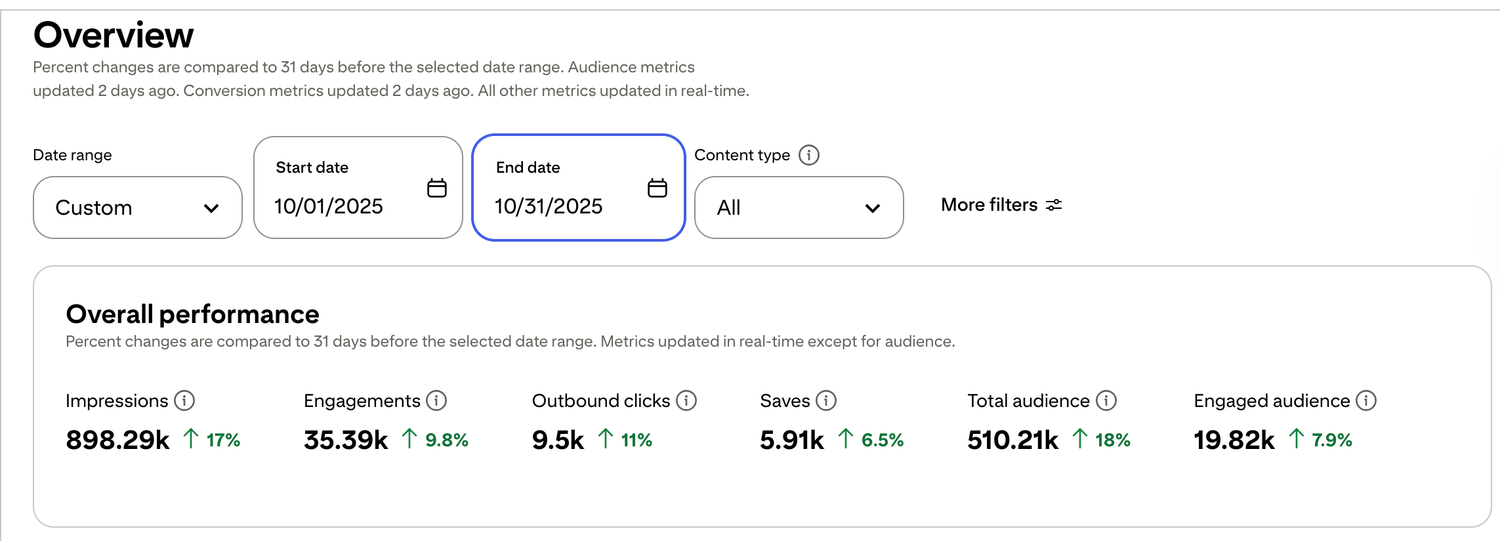
🎯 See a Real Pinterest Traffic Example
This snapshot shows how content, pin design, and posting can work together over time.
If you want my exact Pinterest affiliate setup (landing page + emails + weekly pin plan), I organized it step-by-step inside my Core System (it’s $27). No pressure — But if you want Pinterest traffic to turn into commissions, the setup matters more than trying to do everything at once.

Free guide for beginners who want a simpler starting point
🎯 Ready to See the Free Guide?
Download the guide and explore the simple setup inside.
🔒 100% Secure • No Spam • Unsubscribe Anytime

A blog sharing practical tips on online tools, affiliate marketing, beginner-friendly workflows, and working from home.


