
How to Track Pinterest Affiliate Clicks (So You Stop Guessing)
If you do not track your Pinterest traffic properly, it is very easy to fool yourself.
You might see:
impressions going up
saves going up
clicks coming in
…and still have no clear idea what is actually working.
That is where a lot of people get stuck.
They keep posting.
They keep pinning.
They keep hoping.
But they are still guessing.
The goal is not just to get “activity.”
The goal is to know:
which pins bring useful clicks
which pages hold attention
which pages get opt-ins
which clicks turn into affiliate clicks
which traffic paths actually make money
This post will show you how to track Pinterest affiliate clicks in a simple beginner-friendly way, so you stop guessing and start seeing what is actually happening.
New here? Start with the free guide that shows the setup behind this process ↓

Free Setup Guide
Want the Simple Pinterest Affiliate Setup?
See how content, traffic, and follow-up can work together in a clear beginner-friendly way.
- Simple 3-step setup
- Built for beginners
- Covers pages, traffic, and follow-up
Disclosure: I may earn a commission from links in this post (no extra cost to you).
Quick truth: Pinterest tracking is not just “checking clicks”
A lot of beginners think tracking means:
“Did my pin get clicks or not?”
That is only the first layer.
Because one pin can get:
lots of clicks
low-quality traffic
no opt-ins
no affiliate clicks
no sales
Another pin can get:
fewer clicks
better traffic
higher opt-ins
more affiliate clicks
So the goal is not just to count clicks.
The goal is to track what happens after the click too.
That is how you stop wasting time on pins that look good but do not actually move your business forward.
What “tracking Pinterest affiliate clicks” actually means
Let’s make this simple.
There are 5 layers you want to understand:
1) Pinterest outbound clicks
This tells you how many people actually clicked from Pinterest to your page.
This matters more than:
impressions
saves
close-ups
Because outbound clicks mean the person left Pinterest and visited your site.
2) Landing page or blog post visits
Now you want to know:
Did those Pinterest clicks actually become page visits?
This helps you compare:
what Pinterest says
what your site analytics says
Sometimes there is a difference because:
pages load slowly
visitors bounce fast
analytics tools count a little differently
That is normal.
But it still helps you spot problems.
Want the simple setup behind this?
Get the free Pinterest affiliate blueprint. It shows the simple flow: niche → pins → one page → email follow-up.
Related reading: How To Make Money By Pinning on Pinterest (Beginner Guide)
3) Opt-ins
This is one of the most important numbers.
If your setup is:
Pin → page → opt-in
Then you want to know:
How many of those visitors became leads?
Because an opt-in tells you the traffic was not just curious.
It was interested enough to take a next step.
4) Affiliate clicks
Now you want to know:
How many people clicked from your page or email to your affiliate offer?
This shows whether:
the offer placement makes sense
the traffic is warm enough
the page is doing its job
5) Sales or conversions
This is the final layer.
You want to know if:
the traffic clicks
the traffic opts in
the traffic clicks the offer
the traffic buys
That full path tells the real story.
Not just the first click.
What to check inside Pinterest
Pinterest gives you useful clues.
But you need to look at the right ones.
1) Outbound clicks
This is one of the best numbers to watch.
It tells you how many people actually left Pinterest for your page.
If a pin gets:
high impressions
good saves
weak outbound clicks
…then the visual might be doing okay, but the click intent may not be strong enough.
2) Saves
Saves still matter.
They can be a good sign that people find the content useful.
But saves do not always mean conversion.
A lot of people save things they never act on.
So treat saves as a supporting signal, not the final goal.
3) Pin-level performance
Do not only look at account-wide stats.
Look at:
which individual pins get outbound clicks
which titles/angles get more action
which designs perform better
which keywords keep showing up on winners
This helps you see patterns.
4) Top URLs
Sometimes one post URL keeps getting clicks from multiple pins.
That matters.
Because sometimes the winner is not just the pin.
It is the topic + pin angle + destination page combination.
So track which URLs keep pulling traffic.
5) Top creatives
Some visuals pull better than others.
For example:
clean desk scenes
flatlays
screenshots
vector graphics
checklist-style pins
You want to notice which visual styles keep getting better outbound clicks.
That helps you make smarter batches later.

Related reading: Affiliate Disclosure for Pinterest (Examples + Where to Put It)
What to check on your site
Pinterest tells you what happened on Pinterest.
Your site tells you what happened after the click.
That is where a lot of the useful truth lives.
1) Page views
Start simple.
Did the page actually get visits?
This helps confirm whether the Pinterest click turned into a real site visit.
If outbound clicks are high but page views look weak, there may be a problem like:
page speed
mismatch
bounce too fast
tracking differences
2) Time on page
This is useful because it shows whether people actually stayed.
If people land and leave in a few seconds, that usually means:
the page did not match the pin
the page felt confusing
the page looked too salesy
the next step was not clear
If time on page is stronger, that is a better sign.
3) Opt-in rate
This is one of the most useful metrics for Pinterest traffic.
If the page gets traffic but no opt-ins, that tells you something is weak in the flow.
Maybe:
the page is not clear enough
the CTA is weak
the message match is off
the traffic angle is wrong
If opt-in rate is strong, that tells you the traffic and page are aligned.
4) CTA clicks
If possible, track which buttons get clicked.
For example:
top opt-in button
middle opt-in button
bottom CTA
soft product bridge
This shows where visitors are responding best.
Sometimes the page is fine, but one CTA placement is doing most of the work.
That is useful to know.
5) Bounce clues
You do not always need complicated metrics.
Sometimes simple clues are enough.
Ask:
are visitors staying?
are they clicking anything?
are they opting in?
are they moving deeper into the site?
If not, there is probably friction somewhere.
How to track affiliate links simply
A lot of people make this harder than it needs to be.
You do not need a giant complicated dashboard to start.
Here is a simple way to track better.
1) Use one clear page per angle when possible
If one blog post is about:
Pinterest affiliate disclosure
and another is about:
best affiliate programs for Pinterest
keep those separate.
That way you can see which topic is actually producing:
page visits
opt-ins
affiliate clicks
Clear page focus makes tracking easier.
2) Keep your links organized
Do not throw affiliate links everywhere with no system.
Keep them:
relevant to the topic
limited
placed intentionally
That makes it easier to tell what is working.
If every page has too many random links, the data gets messy.
3) Compare clicks vs opt-ins vs offer clicks
This is where the real learning happens.
For example:
Page A
good Pinterest clicks
weak opt-ins
weak offer clicks
That usually means the page or message match needs work.
Page B
lower traffic
stronger opt-ins
stronger offer clicks
That page may actually be the better money page.
This is why volume alone can mislead you.
4) Track angles, not just URLs
Sometimes the same URL has many pins pointing to it.
That means you also want to notice which angles perform better.
Examples:
“safe setup”
“beginner guide”
“checklist”
“fix this”
“what works now”
Some angles bring better clicks than others.
That matters when planning more pins.
If you want help spotting stronger keyword and topic angles before building more pins, this Pinterest research tool can help you see clearer keyword patterns and content direction.
That can reduce a lot of guesswork before you make the next batch.
You might like - Best Landing Page for Pinterest Affiliate Traffic (Simple Template)
What most people get wrong
This is where a lot of the confusion comes from.
1) They only check impressions
Impressions are nice.
But impressions do not mean much by themselves.
A pin can get seen a lot and still do very little for your business.
2) They only check saves
Saves can feel encouraging.
But saves are not the same as conversions.
Some of your most saved pins may not be your best money pins.
3) They do not compare page behavior
They see traffic and assume the page is fine.
But sometimes the traffic is landing and leaving fast.
If you do not check what happens after the click, you miss the real problem.
4) They treat all clicks like equal clicks
Not all clicks are useful clicks.
Some clicks are:
curious
random
low-intent
Other clicks are:
more aligned
more trusting
more likely to opt in
Tracking helps you tell the difference.
5) They do not document patterns
A lot of people rely on memory.
That makes things messy fast.
Even a simple note or spreadsheet helps.
You can track:
pin angle
destination page
clicks
opt-ins
affiliate clicks
what changed
That gives you much better clarity over time.
Best beginner tracking setup
You do not need to overcomplicate this.
A simple tracking stack is enough.
Pinterest analytics
Use this to check:
outbound clicks
top pins
top URLs
top creatives
Site analytics
Use this to check:
page views
time on page
visitor behavior
top pages
If you want an easy way to watch on-site behavior more closely, a tool like Clicky Analytics can help you see page-level activity and traffic flow more clearly.
Page / CTA tracking
Watch:
opt-in rate
button clicks
where people respond most
Simple spreadsheet or notes
Track:
URL
pin angle
date
outbound clicks
opt-ins
affiliate clicks
notes
That is enough to start.
Simple beats messy.
How to know if a page is working
Ask these simple questions:
Is the page getting Pinterest clicks?
If no, the pin angle may need work.
Is the page holding attention?
If no, the message match may be weak.
Is the page getting opt-ins?
If no, the CTA or page structure may need work.
Are people clicking the offer?
If no, the recommendation may not feel strong or natural enough.
Are any of these turning into sales?
If no, the offer fit or traffic quality may be the issue.
This kind of thinking is much better than guessing.
Tracking helps you make better decisions
The real value of tracking is not just “seeing numbers.”
It is making better decisions like:
which posts deserve more pins
which pin angles deserve more testing
which pages need a stronger CTA
which topics attract better traffic
which offers fit better
which pages are wasting traffic
That is where the money side gets better.
A simple example
Let’s say you have 2 posts:
Post A
Gets lots of Pinterest clicks but weak opt-ins.
Post B
Gets fewer clicks but strong opt-ins and stronger affiliate clicks.
A lot of beginners focus on Post A because it looks bigger.
But Post B may actually be the smarter page to scale.
That is why tracking matters.
It helps you grow the right things.
If you are getting clicks but still feel lost…
That usually means one of these is missing:
you are not checking the right metrics
your pages are not clearly separated by topic
you are not comparing clicks to opt-ins
you are not tracking which angles create better traffic
That is fixable.
And once you start tracking more clearly, your decisions get much easier.
You can also read:
Pinterest Clicks but No Sales? Here’s What’s Missing (Fix This)
That post connects directly with this one.
Quick checklist: Pinterest affiliate tracking
Before you say “this pin worked,” check this:
✅ Did it get outbound clicks?
✅ Did the page get real visits?
✅ Did visitors stay on the page?
✅ Did the page get opt-ins?
✅ Did people click the affiliate offer?
✅ Did that traffic lead to sales or stronger intent?
✅ Did you note which angle brought the traffic?
If not, you may still be guessing.
Want the simple setup behind this?
Get the free Pinterest affiliate blueprint.
It shows the simple flow: niche → pins → one page → email follow-up.
Download the free guide here ↓
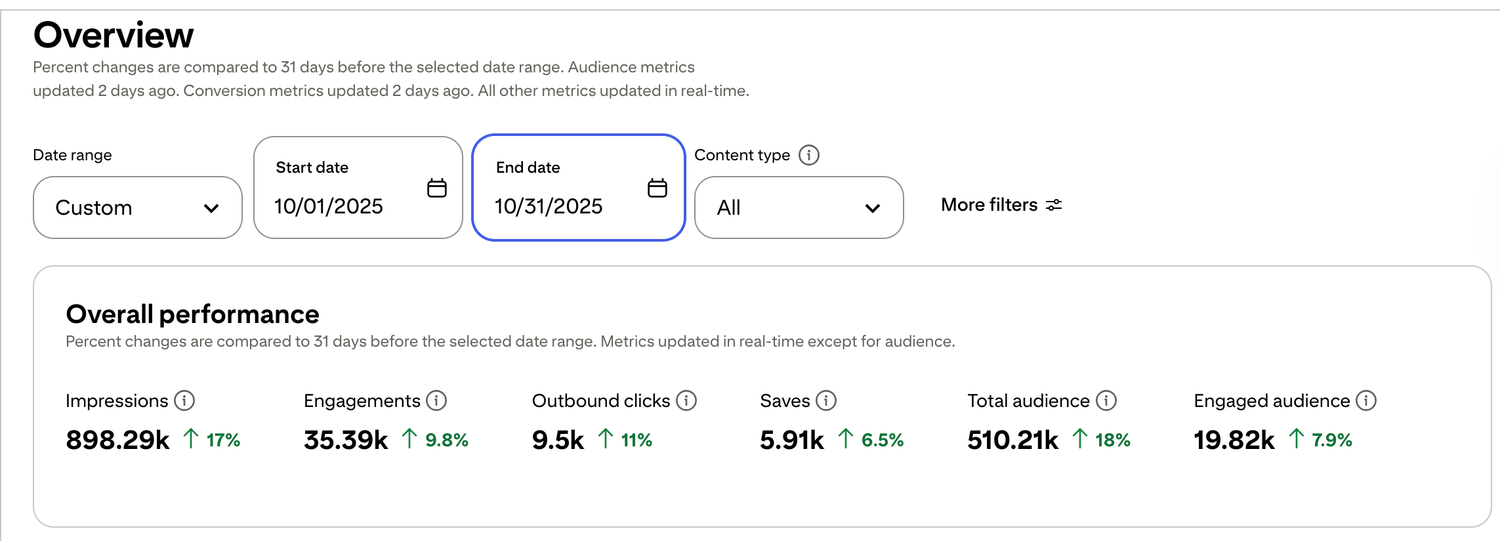
🎯 See a Real Pinterest Traffic Example
This snapshot shows how content, pin design, and posting can work together over time.
If you want my exact Pinterest affiliate setup (landing page + emails + weekly pin plan), I organized it step-by-step inside my Core System (it’s $27). No pressure — But if you want Pinterest traffic to turn into commissions, the setup matters more than trying to do everything at once.

Free guide for beginners who want a simpler starting point
🎯 Ready to See the Free Guide?
Download the guide and explore the simple setup inside.
🔒 100% Secure • No Spam • Unsubscribe Anytime

A blog sharing practical tips on online tools, affiliate marketing, beginner-friendly workflows, and working from home.


