
6 Low-Stress Online Jobs for Beginners Who Want a Simple Start
Let’s be honest…
Most people don’t want another complicated online business idea.
They want something simple.
Something flexible.
Something they can start from home without feeling like they need a degree, a huge audience, or advanced tech skills.
That’s what this guide is about.
These are beginner-friendly online job ideas that can help you start building skills, get small wins, and explore real ways to earn from home over time.
They are not magic.
They are not instant income.
And they do not guarantee a certain monthly result.
But if you want a simple place to start, these ideas can help you see what is possible.

Free Setup Guide
Want to See How the Affiliate Setup Fits Together?
This free guide shows how pages, traffic, and follow-up work together in a simple beginner-friendly way.
🔒 Get the Free Guide ➜Disclosure: At no cost to you, I may get commissions for purchases made through links in this post.
What I Mean by “Low-Stress Online Jobs”
A low-stress online job does not mean you do nothing.
It means the work is usually simple, repeatable, and easier to understand than starting a big online business from scratch.
For beginners, that matters.
You may want something that feels:
flexible
simple to learn
easy to practice
beginner-friendly
possible to start with basic tools
That does not mean every job is easy money.
You still need consistency, communication, and practice.
But the right simple job can feel much less overwhelming than trying to learn everything at once.
1. Pinterest Pin Creator
Pinterest is a visual search platform.
That means bloggers, creators, and online business owners need fresh pins to promote their content.
A Pinterest pin creator helps make those pins.
You may create simple graphics using tools like Canva, write short pin titles, and help organize content ideas.
This can be a good beginner option because the work is visual and repeatable.
You do not need to be a professional designer to start learning. But you do need to understand what makes a pin clear, clickable, and helpful.
Why beginners like it:
You can start with Canva
The work is simple to understand
You can build samples quickly
Many bloggers need fresh pin designs
It connects well with Pinterest traffic skills
Possible pay depends on your samples, quality, speed, and the type of client you work with.
A simple way to start is to create 5–10 sample pins for practice blog topics, then use them as a small portfolio.
2. Canva Template Creator
If you enjoy simple design, Canva templates can be a good path to explore.
People need templates for Pinterest pins, Instagram posts, planners, worksheets, ebooks, and business graphics.
Instead of designing custom graphics for every client, you can create templates that others can reuse.
This can turn into client work, digital products, or template packs over time.
Why this works well:
Canva is beginner-friendly
Templates are useful in many niches
You can practice without needing clients first
Your samples can also become products later
Start simple.
Create templates for one type of person, like bloggers, coaches, small businesses, or Pinterest users.
The more specific your templates are, the easier it is for the right person to understand why they need them.

Related reading: Pinterest Affiliate Marketing for Beginners: How the Setup Works
3. AI-Assisted Content Helper
Many businesses and creators need help creating simple content.
That could mean blog outlines, Pinterest descriptions, email drafts, product descriptions, or social media captions.
AI tools can help with first drafts, but someone still needs to review, edit, clean up, and make the content useful.
That is where an AI-assisted content helper can fit.
You are not just clicking a button.
You are helping turn rough ideas into cleaner content.
Tasks may include:
editing AI drafts
writing blog outlines
creating Pinterest descriptions
improving headlines
organizing content ideas
turning one piece of content into smaller posts
This can be a good beginner option if you like writing, organizing ideas, and making content easier to read.
The key is not to promise “AI does everything.”
The value is in making the final content clear, helpful, and human.
4. Simple Online Task Work
Some online work is based on small tasks.
This can include organizing information, checking data, testing websites, tagging images, or helping with basic admin work.
These tasks are usually not glamorous.
But they can be a simple way to understand online work without building a full business right away.
Why beginners may like this:
Tasks are usually clear
You can start with basic computer skills
It can help you build confidence
You do not need to create content publicly
The downside is that task work can be inconsistent.
Some platforms have more work than others, and pay can vary a lot.
So this is better as a starting point, not your only long-term plan.
Use it to get comfortable earning online, then build a stronger skill on the side.
5. Digital Product Assistant
Digital products are everywhere now.
People sell ebooks, templates, checklists, planners, mini-courses, and guides.
A digital product assistant helps creators build or organize those products.
You might help with formatting, simple design, proofreading, uploading files, or creating bonus materials.
This is a great path if you like working behind the scenes.
You could help with:
formatting ebooks
creating worksheets
organizing course files
designing simple PDFs
writing product descriptions
making Canva bonuses
This can also teach you how digital products work.
Later, you may decide to create your own simple product too.
Start by learning one small task, like Canva PDF design or ebook formatting. Then offer that as a beginner service.
6. Blog Content Assistant
Many bloggers need help keeping their websites updated.
A blog content assistant can help with simple tasks like formatting posts, adding images, writing meta descriptions, finding internal links, or creating Pinterest pin ideas for each article.
This is useful work because bloggers often have many moving parts.
They do not just write posts.
They also need SEO, images, links, emails, pins, and updates.
Beginner-friendly tasks include:
formatting blog posts
adding headings
creating Pinterest title ideas
writing short descriptions
checking links
finding simple keyword ideas
turning blog posts into social content
This is a good option if you like blogs, Pinterest, or content marketing.
And if you already want to build your own blog later, this gives you useful experience.
📘 Want a Clearer Look at the Setup?
This free guide shows how pages, traffic, and follow-up can work together in a clear step-by-step flow.
Related reading: How Beginners Can Make Money on Pinterest: 5 Simple Ways
Which Online Job Should You Start With?
Do not choose the one that sounds the most impressive.
Choose the one that feels easiest to practice this week.
If you like design, start with Pinterest pins or Canva templates.
If you like writing, start with AI-assisted content or blog help.
If you like simple tasks, start with online task work.
If you like digital products, start with product assistant work.
The goal is not to master everything.
The goal is to pick one simple path and build confidence.
How These Jobs Can Turn Into Real Income Over Time
The goal is not to chase a big number on day one.
The goal is to build a simple path.
Here is what that usually looks like:
Pick one beginner-friendly skill
Create a few samples
Apply for small projects
Improve your work
Build trust with people
Raise your rates slowly
Add better clients or simple products later
That is how online income becomes more realistic.
Small projects can lead to better projects.
Basic skills can turn into paid services.
And simple work can become more valuable when you stay consistent.
Helpful Tools for Getting Started
You do not need every tool.
Start with the tool that matches the job you want to try.
For example:
Use Canva if you want to create pins or templates.
Use Systeme.io if you want to build a simple opt-in page or email follow-up.
Use Bluehost if you want to start a WordPress blog.
Use SmarterQueue if you want help planning and scheduling content.
Use SEOWriting.AI if you want help drafting blog-style content.
Use Pinclick if you want to research Pinterest keywords and trends.
The tool does not build the business for you.
But the right tool can make the next step easier.

Related reading: How To Make Money By Pinning on Pinterest (Beginner Guide)
Final Thoughts: Start Simple, Then Build From There
You do not need to figure out the whole internet today.
You just need one simple place to start.
Pick the job idea that feels easiest for your current life.
Maybe that is Pinterest pins.
Maybe it is Canva templates.
Maybe it is AI-assisted editing.
Maybe it is blog support.
Start with one.
Practice it.
Build a few samples.
Then improve from there.
That is how beginners move from confusion to clarity.
And once you understand how simple online work connects with traffic, email, and offers, the whole path starts to feel much less overwhelming.
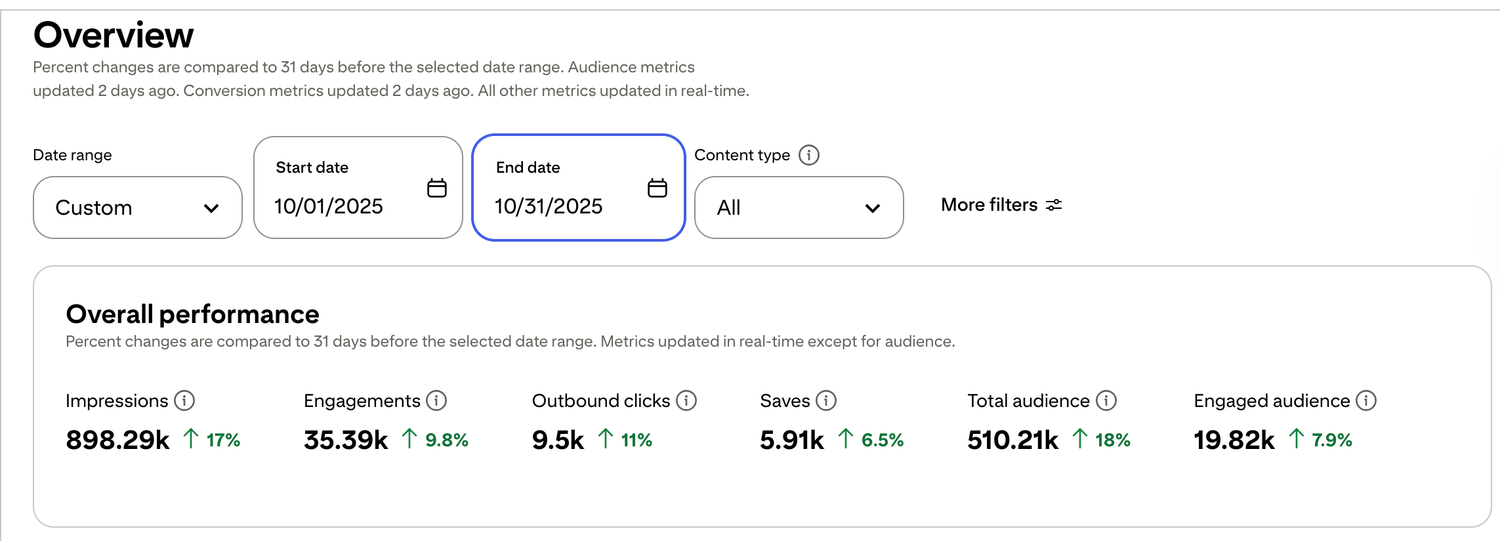
🎯 See a Real Pinterest Traffic Example
This snapshot shows how content, pin design, and posting can work together over time.
Want a clearer look at how the setup works? Start with the free setup guide . It walks through the pages, follow-up, and simple structure step by step.

Free guide for beginners who want a simpler starting point
🎯 Ready to See the Free Guide?
Download the guide and explore the simple setup inside.
🔒 100% Secure • No Spam • Unsubscribe Anytime

A blog sharing practical tips on online tools, affiliate marketing, beginner-friendly workflows, and working from home.


