
7 Simple Steps to Create an Online Course Using Systeme.io
Are you ready to share your knowledge and earn money by creating an online course? With the right tools, building a course is easier than you think—and Systeme.io makes the entire process simple and stress-free.
In this guide, I’ll walk you through 7 easy steps to create an online course using Systeme.io. Whether you're a beginner or an experienced entrepreneur, you'll find everything you need to launch your course successfully.

Free Setup Guide
Want to See the Simple Setup?
Learn how content, traffic, and follow-up can fit together in a clear beginner-friendly way.
🔒 Get the Free Guide ➜Disclosure: At no cost to you, I may get commissions for purchases made through links in this post.
Step 1: Plan Your Course Content
The first step is deciding what you want to teach and who your audience is.
How to do it:
Identify your target audience’s pain points and challenges.
Create an outline of topics you’ll cover.
Break your content into modules or lessons for easier consumption.
💡 Pro Tip: Start with a niche you’re passionate about—teaching what you know best will feel more natural!
Step 2: Sign Up for Systeme.io
If you don’t already have a Systeme.io account, now’s the time to sign up.
Why Systeme.io? It’s an all-in-one platform that simplifies course creation, hosting, and selling. With plans starting at $0, there’s no risk to get started.

Step 3: Set Up Your Online Course
Once logged in, navigate to the “Products & Sales” section, then select “Courses.”
How to Create Your Course:
1. Click on “Add a New Course.”
2. Enter your course name and description.
3. Choose a theme that matches your brand.
4. Customize your course layout with the drag-and-drop editor.

💡 Pro Tip: Use Systeme.io’s pre-designed templates to save time and make your course look professional.
Step 4: Upload Your Content
With your course structure ready, it’s time to upload your lessons.
What You Can Add:
Videos: Record and upload video lessons directly to Systeme.io.
PDFs & Resources: Include downloadable workbooks, guides, or cheat sheets.
Quizzes: Add interactive quizzes to test your students' knowledge.

Systeme.io makes it easy to organize and deliver your content in a way that’s engaging and user-friendly.
Step 5: Set Up Your Sales Funnel
Your course won’t sell itself—you need a strategy to attract and convert customers. Systeme.io’s built-in funnel builder helps you do just that.
How to Create a Sales Funnel:
1. Choose a funnel template from Systeme.io.
2. Add a lead magnet (e.g., free ebook or webinar) to capture emails.
3. Set up a sales page to showcase your course benefits.
4. Add checkout pages and payment options.

💡 Pro Tip: Highlight the transformation your course offers to convince prospects to buy!
Step 6: Automate Your Marketing
Systeme.io’s email automation tools let you nurture leads and turn them into paying customers.
What You Can Automate:
Welcome emails for new subscribers.
Course launch announcements.
Follow-up emails for abandoned carts.

Use pre-built email sequences or create custom ones that guide your audience through the buying journey.
📘 Want to See the Full Setup?
If you want a clearer look at how the pieces fit together, this free guide walks through the setup in a simple beginner-friendly way.
Step 7: Launch and Promote Your Course
With your course ready to go, it’s time to launch! Here’s how to spread the word:
1. Social Media: Share your course link on platforms like Pinterest, Instagram, and LinkedIn.
2. Email Marketing: Announce your course to your email list.
3. Affiliate Program: Let others promote your course using Systeme.io’s affiliate management feature.
💡 Pro Tip: Use Pinterest keywords like “online course creation” and “start an online course” to drive traffic to your course sales page.
Why Systeme.io is the Best for Course Creation
Unlike other platforms that charge hefty fees, Systeme.io offers a free plan that includes all the tools you need to:
Create a professional-looking course.
Build sales funnels and automate marketing.
Manage affiliates and payments seamlessly.
With Systeme.io, you can focus on delivering value to your students—not worrying about tech headaches or extra costs.
Conclusion
Creating an online course doesn’t have to be overwhelming. With Systeme.io, you can go from idea to income in just 7 simple steps.
Whether you're a coach, consultant, or entrepreneur, Systeme.io empowers you to turn your expertise into a profitable online course.
So what are you waiting for?
Save this PIN to your favorite Pinterest board

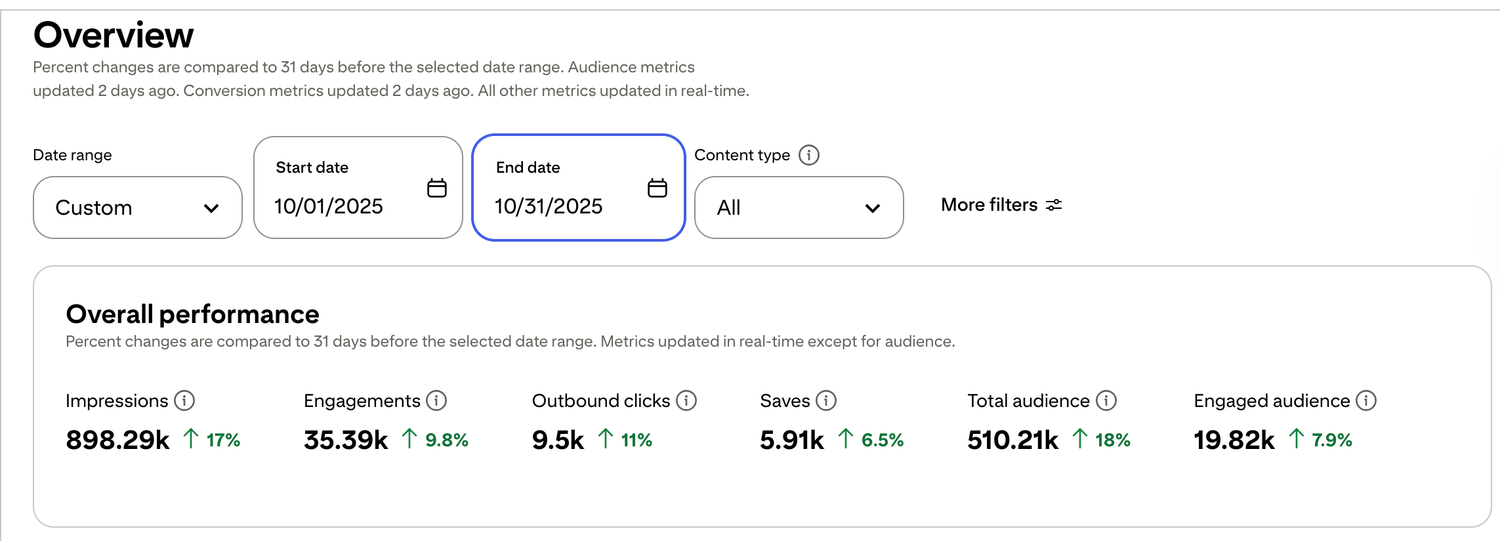
🎯 See a Real Pinterest Traffic Example
This snapshot shows how content, pin design, and posting can work together over time.
Want to see how the full setup fits together? Start with the free setup guide . It walks through the pages, follow-up, and simple structure step by step.

Free guide for beginners who want a simpler starting point
🎯 Ready to See the Free Guide?
Download the guide and explore the simple setup inside.
🔒 100% Secure • No Spam • Unsubscribe Anytime

A blog sharing practical tips on online tools, affiliate marketing, beginner-friendly workflows, and working from home.


