
How to Start a Shopify Store: Step-by-Step Guide for Beginners
Starting your first online store might seem overwhelming, but with Shopify, it’s simpler than you think!
Shopify is one of the most beginner-friendly platforms to create an online store. Whether you’re selling handmade crafts, dropshipping, or offering digital products, Shopify provides all the tools you need to succeed.
Follow this step-by-step guide to launch your store in just a few hours.

Free Setup Guide
Want to See How the Setup Fits Together?
Learn how content, traffic, and follow-up can work together in a clear, beginner-friendly way.
🔒 Get the Free Guide ➜Disclosure: At no cost to you, I may get commissions for purchases made through links in this post.
Step 1: Sign Up for Shopify
The first step is to create your Shopify account. It’s quick and easy!
1. Go to the Shopify website.
2. Enter your email address and create a password.
3. Choose your store name (you can change it later).
4. Follow the prompts to set up your store.
Pro Tip: Shopify offers a 14-day free trial to explore all its features. There’s no credit card required to start! Sign up now and take the first step toward building your online store.
Step 2: Choose a Niche and Products
Before designing your store, decide what you want to sell. Picking the right niche is essential for success.
1. Think about your interests and passions.
2. Use Shopify’s market research tools to validate your product ideas.
3.Consider sourcing products from suppliers or creating your own.
Pro Tip: Narrowing down your niche can help you attract the right customers. For example, instead of selling generic clothing, focus on sustainable fashion or activewear for moms.
Step 3: Set Up Your Shopify Store
Once you’ve signed up and chosen a niche, it’s time to build your store.
1. Choose a theme from Shopify’s library (both free and paid options are available).
2. Customize your store by adding a logo, changing colors, and editing the layout.
3. Write compelling product descriptions that highlight benefits, not just features.
Pro Tip: Shopify’s drag-and-drop editor makes it easy to create a professional-looking store, even if you’re not tech-savvy.
📘 Want a Clearer Look at the Setup?
This free guide shows how pages, traffic, and follow-up can work together in a clear step-by-step flow.
Step 4: Add Products to Your Store
Upload your products and provide all necessary details.
1. Add high-quality images for each product.
2. Write engaging descriptions with keywords to optimize for SEO.
3. Set competitive prices and offer discounts if needed.
Pro Tip: Use Shopify’s inventory management tools to keep track of your stock levels.
Step 5: Set Up Payment Methods
Make it easy for your customers to pay you by setting up secure payment options.
1. Go to Settings in your Shopify dashboard.
2. Enable Shopify Payments (or add third-party payment providers like PayPal).
3. Set up additional payment methods, such as Apple Pay or Google Pay, for convenience.
Pro Tip: Shopify Payments has no transaction fees, making it a cost-effective choice for beginners.
Step 6: Configure Shipping Settings
Decide how you’ll deliver products to your customers.
1. Offer free shipping to attract more buyers.
2. Use Shopify Shipping to access discounted rates from major carriers.
3. Clearly display estimated delivery times on your product pages.
Pro Tip: If you’re dropshipping, coordinate shipping details with your suppliers to avoid delays.
Step 7: Launch Your Store
It’s time to go live!
1. Preview your store to ensure everything looks perfect.
2. Set your store to public in the dashboard.
3. Promote your store on social media and through email marketing.
Pro Tip: Use Shopify’s built-in marketing tools to run ads, send email campaigns, and track your store’s performance.
Step 8: Optimize and Grow Your Business
Running a successful store doesn’t end at launch—optimization is key.
1. Analyze your sales data using Shopify’s analytics tools.
2. Experiment with upsells, bundles, and loyalty programs.
3. Update your product offerings based on customer feedback and trends.
Pro Tip: Shopify’s app store has thousands of tools to help you automate tasks and grow your store.
Conclusion
Starting an online store with Shopify is easier than ever. Whether you’re selling physical products or digital downloads, Shopify provides all the tools you need to succeed.
Reassure Yourself: With Shopify’s user-friendly platform, your store is just a few clicks away!
Related Reading – 25 Trending Shopify Store Niche Ideas to Skyrocket Your Online Business
Save this PIN to your favorite Pinterest board

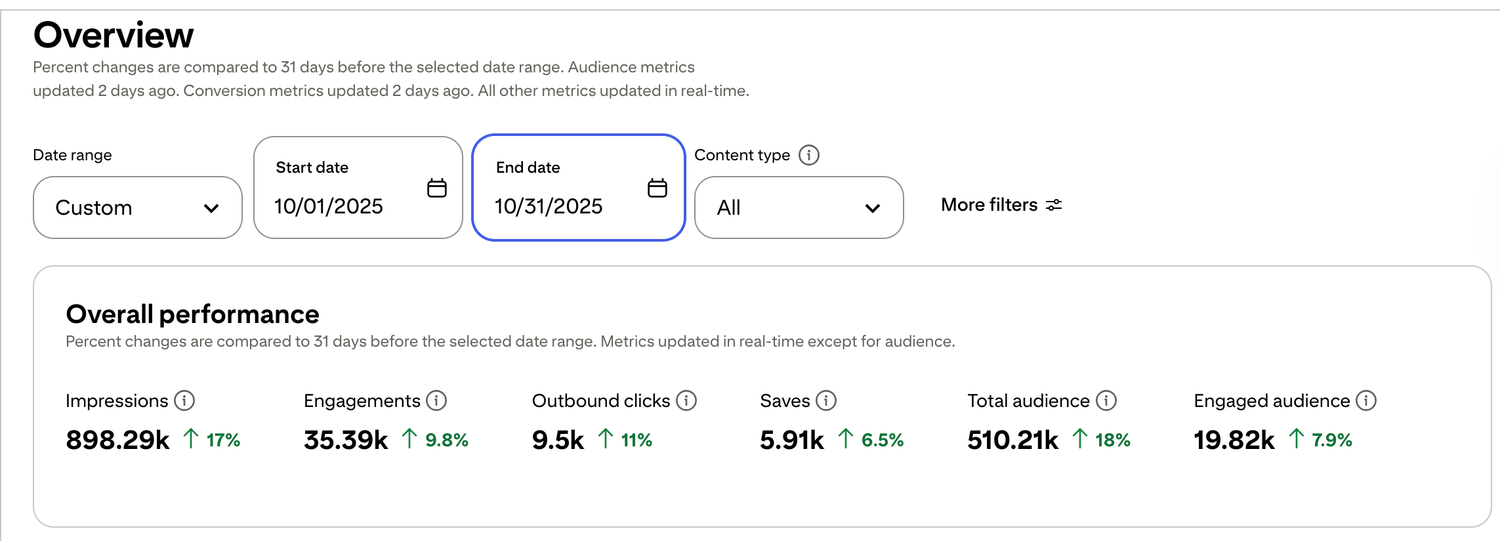
🎯 See a Real Pinterest Traffic Example
This snapshot shows how content, pin design, and posting can work together over time.
Want to see how the full setup fits together? Start with the free setup guide . It walks through the pages, follow-up, and simple structure step by step.

Free guide for beginners who want a simpler starting point
🎯 Ready to See the Free Guide?
Download the guide and explore the simple setup inside.
🔒 100% Secure • No Spam • Unsubscribe Anytime

A blog sharing practical tips on online tools, affiliate marketing, beginner-friendly workflows, and working from home.


