
How I Use CreateStudio to Make Extra Income as a Freelancer
Freelancing is one of the most rewarding career paths, offering flexibility and the chance to work on your own terms. But let’s be real—the competition can be fierce, and finding ways to stand out is crucial. That’s where video marketing comes in, and for me, CreateStudio has been a game-changer in earning extra income as a freelancer.
In this blog post, I’ll share how I use CreateStudio to create stunning videos for clients, diversify my income streams, and build a reputation as a creative professional. If you’re a freelancer looking to take your skills to the next level, this is the tool for you.

Free Setup Guide
Want to See How the Setup Fits Together?
Learn how content, traffic, and follow-up can work together in a clear, beginner-friendly way.
🔒 Get the Free Guide ➜Disclosure: At no cost to you, I may get commissions for purchases made through links in this post.
What is CreateStudio?
CreateStudio is an intuitive, beginner-friendly video creation tool that allows you to design professional-quality videos without advanced technical skills. From explainer videos to social media ads, CreateStudio equips you with everything you need to deliver eye-catching content to clients.
Key Features of CreateStudio:
Drag-and-Drop Editor: Simplifies video creation, even for beginners.
Pre-Made Templates: Save time with customizable, ready-to-go designs.
2D & 3D Animations: Add dynamic elements to your videos.
Flexible Pricing Options: Choose between the affordable $67 Lifetime Deal or the $27/month All Access Pass for premium features.
How I Use CreateStudio to Earn Extra Income
1. Offering Video Services to Clients
One of the simplest ways I’ve used CreateStudio is by offering video creation as a service. Small businesses and entrepreneurs are always in need of promotional videos, explainer animations, and social media content. CreateStudio’s templates make it easy to produce professional-quality videos in a fraction of the time it would take with more complex software.
💡 Pro Tip: Specialize in a niche, like animated explainer videos or Instagram ads, to attract more clients and charge premium rates.
2. Creating Video Ads for Affiliate Marketing
If you’re into affiliate marketing, videos can boost your conversion rates significantly. I’ve used CreateStudio to design engaging video ads that highlight the benefits of the products I’m promoting. Whether it’s for social media or YouTube, these videos consistently drive clicks and sales.
3. Selling Pre-Made Video Templates
Another great way to earn is by creating and selling pre-made video templates. Platforms like Etsy and Creative Market are filled with buyers looking for customizable video templates for their businesses. With CreateStudio, you can quickly create polished, high-quality templates that sell like hotcakes.
💡 Pro Tip: Focus on popular niches like real estate, weddings, or social media marketing to maximize sales.
4. Building a YouTube Channel
YouTube is an excellent platform for generating passive income through ad revenue, sponsorships, and affiliate marketing. I’ve used CreateStudio to produce high-quality intros, explainer videos, and tutorials for my channel. The professional touch has helped me grow my audience and build credibility.
5. Upselling Existing Clients
If you’re already working with clients in other capacities, like graphic design or content writing, consider upselling video creation as an add-on service. It’s an easy way to increase your income without finding new clients.
Why CreateStudio is Perfect for Freelancers
Nothing promotes your business better than satisfied customers. Create short video testimonials where your customers share their experiences with your product or service.
Affordable Pricing: The $67 Lifetime Deal is a no-brainer for freelancers who want professional tools without recurring fees.
Time-Saving: Pre-made templates and an intuitive interface mean you can deliver projects faster.
Versatility: Create everything from ads and tutorials to animated explainer videos.
Scalability: Use it to expand your services and attract higher-paying clients.
📘 Want a Clearer Look at the Setup?
This free guide shows how pages, traffic, and follow-up can work together in a clear step-by-step flow.
Final Thoughts
If you’re a freelancer looking to boost your income, stand out from the competition, and offer more value to your clients, CreateStudio is the tool you need. Whether you’re creating videos for clients, building a YouTube channel, or selling templates, the possibilities are endless.
Don’t miss this opportunity to elevate your freelancing game.
👉 Grab the $67 Lifetime Deal or Unlock the All Access Pass for $27/Monthand start making extra income today!
Related Reading – 5 Creative Video Ideas to Promote Your Business Online
Save this PIN to your favorite Pinterest board

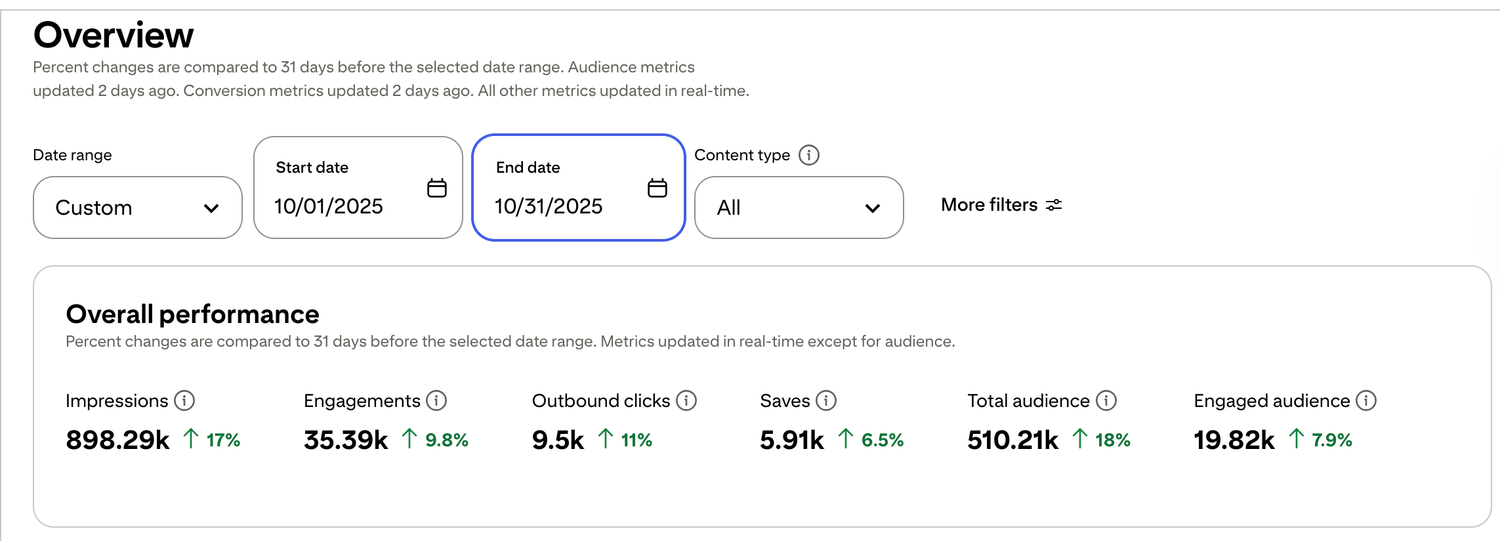
🎯 See a Real Pinterest Traffic Example
This snapshot shows how content, pin design, and posting can work together over time.
Want a clearer look at how the setup works? Start with the free setup guide . It walks through the pages, follow-up, and simple structure step by step.

Free guide for beginners who want a simpler starting point
🎯 Ready to See the Free Guide?
Download the guide and explore the simple setup inside.
🔒 100% Secure • No Spam • Unsubscribe Anytime

A blog sharing practical tips on online tools, affiliate marketing, beginner-friendly workflows, and working from home.


